

As of late 2025, Python continues to evolve with a focus on performance improvements through the Faster CPython project. One of the most anticipated developments is the experimental Just-In-Time (JIT) compiler introduced in CPython 3.13 and refined in subsequent releases. This native JIT aims to boost runtime performance by compiling frequently executed code paths to machine code, without requiring external tools like Numba or switching to alternative interpreters like PyPy.
While still experimental and not enabled by default in standard builds, the JIT represents a foundational step toward making CPython significantly faster in future versions. This guide, updated for the current state as of December 2025, explains what the JIT is, how it works, its current performance impact, and how to get started experimenting with it.
What Is Python's Native JIT Compiler?
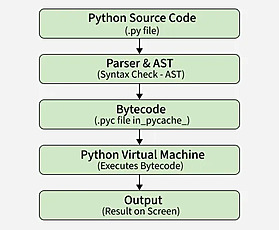
The JIT compiler in CPython is a built-in feature that dynamically translates Python bytecode into native machine code during execution. Introduced via PEP 744 in Python 3.13 (released October 2024), it uses a lightweight "copy-and-patch" technique. This method pre-generates machine code templates and patches them at runtime for specific code paths, avoiding heavy dependencies during execution.
Unlike full tracing JITs (e.g., in PyPy), this approach is designed to be minimal and incremental, allowing future optimizations while maintaining CPython's stability.
Key facts:
- Experimental status: Disabled by default; requires custom build.
- Not compatible with free-threaded (no-GIL) builds in early versions, though work is ongoing.
- Build-time dependency: Initially required LLVM, but efforts (e.g., PEP 774) aim to remove this for broader accessibility.
Current Performance Impact (as of 2025)
Performance gains from the JIT vary widely by workload:
- Initial benchmarks in Python 3.13 showed modest improvements of 2-9% on average, with some CPU-bound tasks gaining up to 20-30%.
- Iterative, loop-heavy code (e.g., Mandelbrot fractal generation) benefits most.
- Recursive or I/O-bound code often sees little to no improvement—or even slight slowdowns due to compilation overhead.
- In 2025 updates (Python 3.13 maintenance releases and previews of 3.14/3.15), refinements have yielded better results in targeted benchmarks, but overall speedups remain inconsistent.

Experts note that the JIT's primary value is enabling future optimizations rather than immediate dramatic speedups. Core developers emphasize benchmarking your specific code, as results are highly workload-dependent.
How to Enable and Use the Experimental JIT
To experiment with the JIT, you must build CPython from source with the experimental flag.
Step-by-Step Build Instructions
- Download CPython source (for the latest 3.13.x or preview branches):text
git clone https://github.com/python/cpython.git cd cpython git checkout 3.13 # Or main for latest development - Configure with JIT enabled:text
./configure --enable-optimizations --with-lto --enable-experimental-jit- On Windows: Use PCbuild\build.bat --experimental-jit.
- Note: You may need LLVM installed (version 19+ recommended in 2025).
- Build and install:text
make -j $(nproc)
make altinstall  # Installs as python3.13 alongside your system Python
Running with JIT Enabled
The JIT is off by default even in JIT-built interpreters. Enable it at runtime:
PYTHON_JIT=1 python3.13 your_script.pyVerify JIT support:
import sys

print(sys._jit.is_available())  # True if built with JIT support
print(sys._jit.is_enabled())    # True if PYTHON_JIT=1
No built-in profiling for JIT activity exists yet—rely on timing your code with and without the flag.
Limitations and Caveats
- Experimental only: Not recommended for production; behavior may change or introduce bugs.
- Inconsistent gains: Test thoroughly—some code runs slower.
- No instrumentation: Limited visibility into what code is JIT-compiled.
- Platform-specific: Best supported on x86_64; varying results on other architectures.
- Future-focused: Significant improvements expected in Python 3.14+ and beyond.
Should You Use It Today?
For most developers, stick with standard CPython builds. The experimental JIT is ideal for:
- Performance enthusiasts testing CPU-bound code.
- Contributors to Faster CPython.
- Early adopters preparing for future defaults.
As the feature matures, it promises to close the gap with JIT-enabled languages without sacrificing Python's simplicity.

For the latest updates, check the official What's New in Python 3.13 and the Faster CPython benchmarking repository on GitHub.
Experiment responsibly, and enjoy the faster Python on the horizon!


Comments